
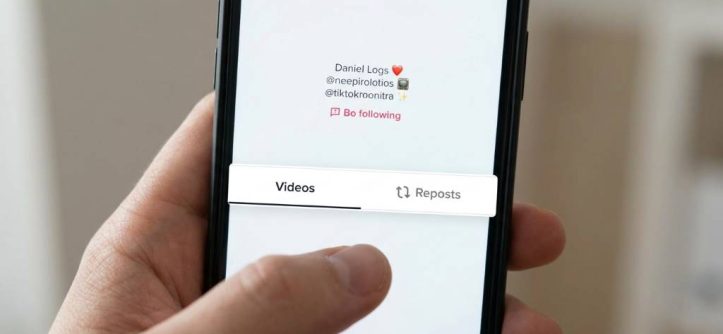
TikTok continues to dominate the social media world with more than one billion active users worldwide. Many people use the repost feature to share entertaining clips with friends and followers. However, users often repost videos by mistake and later want to remove them quickly. Fortunately, TikTok allows users to undo reposts in only a few steps. This guide explains exactly how to remove repost on TikTok while keeping your account organized and professional.
Many creators in the USA use reposts to boost engagement during seasonal trends, especially during winter holidays and summer travel seasons. Still, reposting the wrong video can confuse followers or hurt your content strategy. Therefore, understanding how to manage reposted videos matters for both casual users and influencers. This article covers every important method, troubleshooting step, and useful tip you need. By the end, you will know how to control your repost activity confidently.
What Is The TikTok Repost Feature?
TikTok introduced the repost feature to help users share videos with their followers without downloading or reuploading content. When you repost a video, it appears in your friends’ feeds with your profile attached. This feature works similarly to retweeting on other platforms. As a result, users can quickly spread entertaining or informative videos.
Unlike regular posts, reposted videos do not appear directly on your profile grid. Instead, TikTok pushes them into the For You feed of your followers. Many creators use reposts to support trends, promote collaborations, or share viral clips. However, accidental reposts happen very often during fast scrolling sessions. Therefore, learning how to remove repost on TikTok becomes essential.
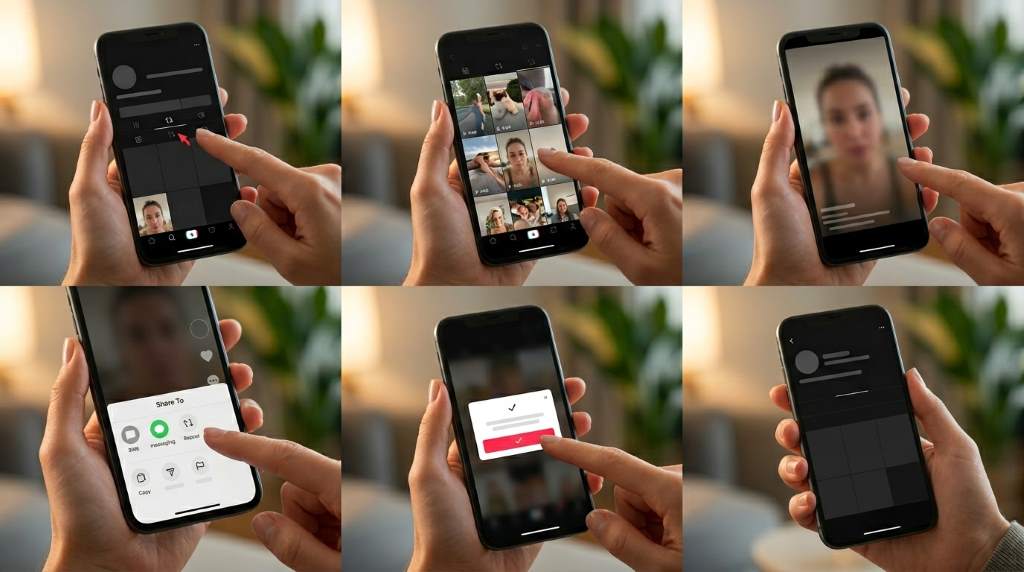
TikTok also allows users to undo reposts instantly. The process remains simple on both Android and iPhone devices. Moreover, users do not need any third-party apps or advanced settings. Everything happens directly inside the TikTok app.
Why People Remove Reposts On TikTok
Many TikTok users remove reposts for different reasons. Sometimes users tap the repost button accidentally while browsing quickly. In other situations, people change their opinions about certain videos later. Therefore, removing reposts helps maintain a cleaner online image.
Content creators often manage reposts carefully to match their personal brand. For example, a fashion creator in New York may repost winter outfit trends during colder months but later remove outdated content in spring. Similarly, travel influencers in California may repost summer vacation videos temporarily. Seasonal trends often influence repost decisions across the USA.
Here are common reasons users undo reposts:
- Accidental reposts
- Outdated trends
- Brand consistency
- Privacy concerns
- Incorrect information
- Duplicate content sharing
Removing reposts quickly prevents confusion among followers. Additionally, it keeps your feed recommendations more aligned with your interests.
How To Remove Repost On TikTok Step By Step
Removing a repost on TikTok only takes a few moments. The process remains nearly identical across devices. Follow these simple steps carefully to undo your repost successfully.
Open The TikTok App
First, launch TikTok on your smartphone or tablet. Make sure you log into the correct account before continuing. Many users manage multiple TikTok profiles, so double-check your username. Afterward, head to the video you reposted earlier.
Find The Reposted Video
You can locate the reposted video through your viewing history, search results, or shared activity. Sometimes the video appears in your watched feed if you viewed it recently. Additionally, you may find it faster by checking messages where you shared the content. Once you open the video, prepare to access the share menu.
Tap The Share Arrow
Look for the share icon on the right side of the screen. It usually appears as a curved arrow. Tap the icon once to open TikTok’s sharing options. You will then see multiple actions available for the video.
Select “Remove Repost”
After opening the menu, find the “Remove Repost” option. TikTok places this button where the repost option originally appeared. Tap it once to undo the repost instantly. The repost disappears immediately from your followers’ feeds.
Confirm The Removal
In most cases, TikTok removes the repost automatically without additional confirmation. However, slower internet connections may delay the update briefly. Therefore, refresh the app if the repost still appears temporarily. Your repost removal should complete within seconds.
How To Remove Repost On TikTok Using Activity History
Sometimes users cannot remember which videos they reposted. Fortunately, TikTok provides tools that help track account activity. This method works especially well for frequent TikTok users.
Access Your Profile
Open TikTok and tap your profile icon at the bottom right corner. Your account dashboard will appear immediately. From there, access your settings and privacy section. TikTok stores account activity inside these menus.
Open Settings And Privacy
Tap the menu icon in the top-right corner of your profile page. Then select “Settings and Privacy” from the available options. Scroll until you find activity-related settings. These sections help users monitor interactions and repost behavior.
Review Watch History
TikTok often stores recently viewed videos in your watch history. Browse through the videos until you locate the reposted content. Although this process may take time, it helps recover older reposts. After finding the video, remove the repost normally.
What Happens After Removing A Repost?
Many users wonder whether TikTok notifies others after repost removal. Fortunately, TikTok does not send notifications when users undo reposts. Therefore, followers usually never notice the change. This makes repost management more private and flexible.
Once removed, the repost stops appearing in followers’ recommendations. However, users can still view the original creator’s content normally. Removing a repost does not affect the original video’s performance. It only removes your shared interaction.
TikTok’s algorithm may also adjust future recommendations based on your actions. Therefore, removing unwanted reposts can improve feed accuracy over time. This helps users maintain a more personalized TikTok experience.
Common Problems When Removing TikTok Reposts
Some users experience issues while trying to remove reposts. Fortunately, most problems have simple solutions. Understanding these issues can save time and frustration.
Repost Button Missing
Sometimes TikTok temporarily removes certain features during app updates. If the remove repost option disappears, restart the app first. Additionally, updating TikTok through the App Store or Google Play often fixes the issue. Older app versions frequently cause feature problems.
Internet Connection Problems
Weak internet connections can delay repost removal. For example, users traveling through snowy regions in Colorado or rural areas may experience slower mobile service. Therefore, switching to stable Wi-Fi can help complete the process faster. Always refresh the app afterward.
Video Deleted By Creator
If the original creator deletes the video, TikTok may remove repost options automatically. In this situation, the repost disappears on its own eventually. Users cannot manually interact with deleted content anymore.
App Cache Issues
TikTok cache files sometimes create temporary glitches. Clearing app cache often resolves repost problems quickly. You can do this through TikTok settings under “Free Up Space.” Afterward, restart the application completely.
Tips To Avoid Accidental TikTok Reposts
Accidental reposts happen frequently during fast scrolling sessions. Fortunately, users can reduce mistakes with a few smart habits. Small adjustments improve overall TikTok control significantly.
Here are helpful ways to avoid unwanted reposts:
- Slow down while scrolling
- Double-check before tapping share buttons
- Keep the app updated regularly
- Clear cache monthly
- Use screen protectors with better touch accuracy
- Avoid multitasking while browsing TikTok
Many users accidentally repost videos while using phones outdoors during summer heat or winter glove usage in the USA. Therefore, careful screen interaction matters more than people realize. Paying closer attention prevents unnecessary repost management later.
Can You Remove Multiple Reposts At Once?
Currently, TikTok does not support bulk repost removal. Users must remove reposts individually through each video. While this process feels time-consuming, TikTok may improve the feature in future updates. Until then, manual removal remains the only option.
Heavy TikTok users should monitor repost activity regularly. Removing reposts immediately after mistakes saves time later. Additionally, frequent review sessions help users maintain cleaner social media activity overall.
Some third-party apps claim to manage reposts automatically. However, using unofficial tools creates security risks for your account. Therefore, always use TikTok’s built-in features instead.
Does Removing A Repost Affect Engagement?
Removing reposts generally has minimal impact on account performance. TikTok focuses more heavily on original content engagement than repost activity. Therefore, users should not worry excessively about occasional repost removals.
However, frequent reposting and deleting may confuse followers slightly. Maintaining a consistent sharing strategy usually produces better long-term engagement. Content creators especially benefit from organized repost habits.
For example, business influencers in cities like Miami or Los Angeles often repost trend-based content strategically during tourism seasons. Removing outdated reposts later helps maintain a polished brand image. Seasonal content management remains common across social platforms.
Best Practices For Managing TikTok Reposts
Smart repost management improves both personal and professional TikTok usage. Users who organize repost activity carefully often build stronger audience trust. Additionally, cleaner repost habits improve content relevance over time.
Follow these best practices consistently:
- Repost only relevant content
- Avoid reposting controversial videos
- Review reposts weekly
- Remove outdated trends quickly
- Support creators thoughtfully
- Maintain consistent brand messaging
Successful TikTok creators often treat reposts as part of a broader content strategy. Therefore, thoughtful repost decisions contribute to better audience engagement and credibility.
Is Removing Reposts Different On iPhone And Android?
TikTok keeps the repost removal process nearly identical across operating systems. Both iPhone and Android users follow the same basic steps. Minor visual differences may appear depending on app versions. However, the functionality remains consistent.
Android users sometimes receive updates slightly later than iPhone users. Therefore, feature availability may vary temporarily. Keeping automatic app updates enabled helps avoid compatibility issues. Most repost problems disappear after updates complete successfully.
Tablet users also follow the same process. Whether using Samsung Galaxy tablets or Apple iPads, TikTok maintains similar navigation menus.
Conclusion
Learning how to remove repost on TikTok helps users maintain better control over their social media presence. Fortunately, TikTok makes the process fast, simple, and private. Whether you reposted accidentally or changed your content strategy, removing reposts only takes a few taps. Additionally, understanding troubleshooting methods prevents unnecessary frustration later.
Consistent repost management improves your TikTok experience significantly. It also helps creators maintain a cleaner and more professional brand image. Start reviewing your repost activity regularly to keep your account organized and engaging. With the right habits, you can enjoy TikTok confidently without worrying about accidental reposts.
FAQs
How do I remove a repost on TikTok quickly?
Open the video, tap the share button, and select “Remove Repost.”
Will TikTok notify others if I remove a repost?
No, TikTok does not notify users when you undo a repost.
Can I remove all TikTok reposts at once?
No, TikTok currently requires users to remove reposts individually.
Why can’t I find the remove repost button?
An outdated app version or temporary glitch usually causes this issue.
Does removing a repost delete the original video?
No, removing a repost only removes your shared interaction with the video.
Related Reads
Check: How To Obtain Followers On Instagram: 100% Working
Learn: How To Recover Conversations On Snapchat
Learn: How to Grow Your Online Brand with Digital Tools: A Strategic Guide for 2026




Leave a Reply