
Telemetry systems play a crucial role in modern operations across industries. These systems collect and transmit data from remote locations to central monitoring stations. However, when problems arise, they can disrupt critical operations and lead to data loss. Therefore, understanding how to troubleshoot telemetry systems effectively is essential for operators and technicians.
This comprehensive guide walks you through the troubleshooting process step by step. Additionally, it provides practical solutions to common telemetry issues you might encounter in the field.
Understanding Telemetry System Basics
Before diving into troubleshooting, you need to understand what telemetry systems do. These systems measure physical or electrical parameters at remote locations. Then, they transmit this data to receiving stations for monitoring and analysis.
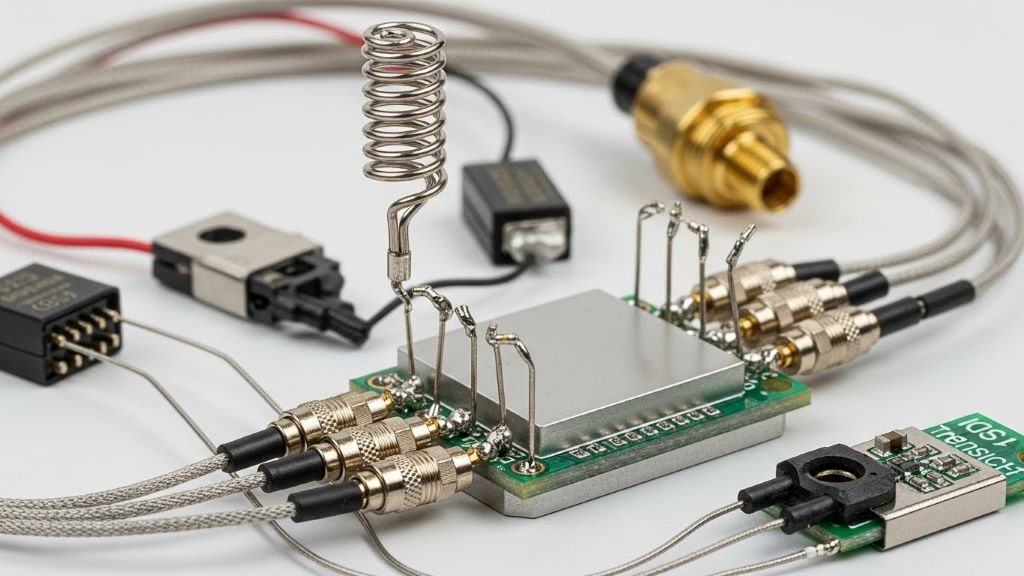
A typical telemetry system consists of several key components. Sensors collect the raw data from the environment. Transmitters send the data through various communication channels. Receivers capture the transmitted signals. Finally, display units present the data in a readable format for operators.
Communication methods vary depending on the application. Some systems use radio frequency transmission. Others rely on satellite links or cellular networks. Furthermore, wired connections still serve many industrial applications effectively.
Initial Assessment and Safety Checks
Safety always comes first when troubleshooting any technical system. Before you begin, ensure all safety protocols are in place. Check for any hazardous conditions in the work area. Moreover, verify that you have the proper personal protective equipment.
Start by gathering information about the problem. Ask operators when they first noticed the issue. Document any error messages or unusual system behavior. Additionally, review recent maintenance logs and system changes. This background information helps you identify potential causes quickly.
Check the power supply to all system components. Many telemetry problems stem from simple power issues. Verify that circuit breakers are engaged and fuses are intact. Furthermore, measure voltage levels at critical connection points to ensure they meet specifications.
Systematic Component Testing
Once you complete the initial assessment, begin systematic component testing. This methodical approach prevents you from overlooking critical issues. Start at the data source and work your way through the transmission chain.
First, test the sensors that collect the raw data. Disconnect sensors from the system and test them individually. Compare their readings against calibrated reference instruments. Replace any sensors showing significant drift or erratic behavior. However, remember that environmental factors can sometimes affect sensor readings temporarily.
Next, examine the signal conditioning equipment. These devices amplify, filter, and process sensor signals before transmission. Check for proper power supply voltages and ground connections. Additionally, verify that configuration settings match the system requirements. Signal conditioners often have adjustable parameters that need periodic verification.
Move on to the transmitter unit after verifying the sensors. Test the transmitter’s output power using appropriate measuring equipment. Check antenna connections and cable integrity carefully. Corroded or loose connections frequently cause intermittent transmission problems. Therefore, clean all connectors and ensure tight, weatherproof seals.
Communication Link Diagnosis
The communication link represents a common failure point in telemetry systems. Environmental factors, interference, and equipment degradation all affect signal quality. Consequently, thorough testing of the communication path is essential.
For radio frequency systems, measure the received signal strength at the monitoring station. Low signal levels indicate transmission problems or path obstructions. Check for new structures or vegetation that might block the signal path. Additionally, verify that antenna alignments have not shifted due to weather or physical disturbances.
Interference from other electronic equipment causes many telemetry problems. Use spectrum analyzers to identify competing signals on your frequency. Industrial equipment, radio transmitters, and even LED lighting can generate interference. Relocating equipment or changing frequencies often resolves these issues effectively.
Network-based telemetry systems require different diagnostic approaches. Test network connectivity using standard ping commands. Check router configurations and firewall settings that might block data packets. Furthermore, verify that IP addresses and port numbers match the system documentation. According to NASA’s guidelines on telemetry systems, proper network configuration is critical for reliable data transmission in modern applications.
Data Processing and Display Troubleshooting
Problems in the receiving and display components affect how operators see the data. Even when the communication link works perfectly, issues here prevent proper system operation. Start by verifying that the receiver is properly tuned to the transmitter frequency.
Check the data decoding software for correct configuration settings. Telemetry systems use various data formats and protocols. Mismatched settings between transmitter and receiver cause garbled or missing data. Additionally, software version incompatibilities sometimes create unexpected problems. Therefore, ensure all system components run compatible firmware versions.
Database and storage systems need regular attention too. Full storage drives prevent new data from being recorded. Check disk space availability on all recording devices. Moreover, verify that backup systems are functioning correctly. Data loss from storage failures can be devastating for critical operations.
Display software requires periodic updates and maintenance. Corrupted configuration files cause displays to show incorrect information. Reset display parameters to factory defaults if you suspect configuration problems. Then, reload the correct settings from verified backup files.
Advanced Diagnostic Techniques
When basic troubleshooting does not resolve the issue, advanced techniques become necessary. These methods require more specialized equipment and expertise. However, they can identify subtle problems that standard tests miss.
Use oscilloscopes to examine signal quality throughout the system. Waveform analysis reveals noise, distortion, and timing problems. Compare waveforms at different test points to isolate problem areas. Additionally, record intermittent signals for later analysis when problems occur sporadically.
Protocol analyzers help diagnose complex digital communication problems. These tools decode data packets and identify transmission errors. They show exactly where data corruption occurs in the communication chain. Furthermore, they reveal timing issues that affect system synchronization.
Environmental monitoring provides valuable troubleshooting information. Temperature, humidity, and vibration affect electronic equipment performance. Install temporary sensors to monitor conditions at problem sites. Correlating environmental data with system failures often reveals root causes.
Preventive Maintenance Best Practices
Preventing problems is always better than fixing them. Regular maintenance keeps telemetry systems running reliably. Develop a comprehensive maintenance schedule for all system components. The Institute of Electrical and Electronics Engineers (IEEE) provides standards and recommendations for electronic system maintenance that apply to telemetry installations.
Clean equipment regularly to prevent dirt and corrosion buildup. Dust and moisture cause many electronic failures over time. Use appropriate cleaning materials that do not damage sensitive components. Additionally, apply corrosion inhibitors to outdoor equipment connections.
Calibrate sensors and instruments according to manufacturer specifications. Calibration drift leads to inaccurate data that undermines system usefulness. Keep detailed calibration records to track equipment performance trends. Replace components that show progressive degradation before they fail completely.
Update firmware and software regularly to maintain security and functionality. However, test updates in non-critical systems before deploying them widely. Document all changes to maintain accurate system configuration records. This documentation proves invaluable during future troubleshooting efforts.
Documentation and Record Keeping
Thorough documentation makes troubleshooting faster and more effective. Create detailed records of every system component and configuration. Include manufacturer information, model numbers, and installation dates. Update these records whenever you make system changes.
Maintain a troubleshooting log for each telemetry system. Record every problem, diagnostic step taken, and solution implemented. These logs reveal patterns in system behavior over time. Moreover, they help train new technicians by providing real-world examples.
Photograph equipment installations and connections during initial setup. These reference photos help identify changes or damage later. Additionally, create wiring diagrams that show actual field installations rather than just theoretical designs.
Conclusion
Troubleshooting telemetry systems requires a systematic, methodical approach. Start with safety checks and basic assessments before moving to complex diagnostics. Test each component individually to isolate problems effectively. Additionally, understand the communication methods your system uses to diagnose link issues properly.
Preventive maintenance significantly reduces troubleshooting frequency. Regular cleaning, calibration, and testing keep systems running reliably. Furthermore, thorough documentation makes future troubleshooting much easier and faster.
Remember that patience and persistence are essential troubleshooting skills. Complex systems sometimes present multiple simultaneous problems. Therefore, take time to verify each fix before moving forward. With practice and experience, you will develop intuition that speeds the troubleshooting process considerably.
Frequently Asked Questions
What are the most common causes of telemetry system failures?
The most common causes include power supply problems, corroded connections, antenna misalignment, and interference from other electronic devices. Additionally, sensor drift and software configuration errors frequently cause system issues. Regular maintenance prevents many of these problems from occurring.
How often should telemetry systems be calibrated?
Calibration frequency depends on the application and manufacturer recommendations. Critical systems typically require calibration every three to six months. However, less critical applications may only need annual calibration. Always follow industry standards and regulatory requirements for your specific application.
Can weather affect telemetry system performance?
Yes, weather significantly impacts telemetry systems. Heavy rain attenuates radio signals, especially at higher frequencies. Extreme temperatures affect electronic component performance. Furthermore, lightning can damage equipment or create temporary interference. Proper weatherproofing and surge protection minimize these effects.
What tools do I need for basic telemetry troubleshooting?
Essential tools include a multimeter for electrical testing, signal strength meters for RF systems, and a laptop with appropriate diagnostic software. Additionally, basic hand tools for accessing equipment and cleaning supplies are necessary. Advanced troubleshooting may require oscilloscopes and spectrum analyzers.
When should I call a specialist instead of troubleshooting myself?
Call a specialist when problems persist after basic troubleshooting or when you lack the proper test equipment. Additionally, seek expert help for issues involving calibration, RF licensing requirements, or complex network configurations. Safety concerns and warranty considerations also warrant professional assistance.
Related Topics:
Powder coating or anodising? How to choose
How an Android App Development Agency Can Maximize App’s Performance




Leave a Reply